Put the right work in view.
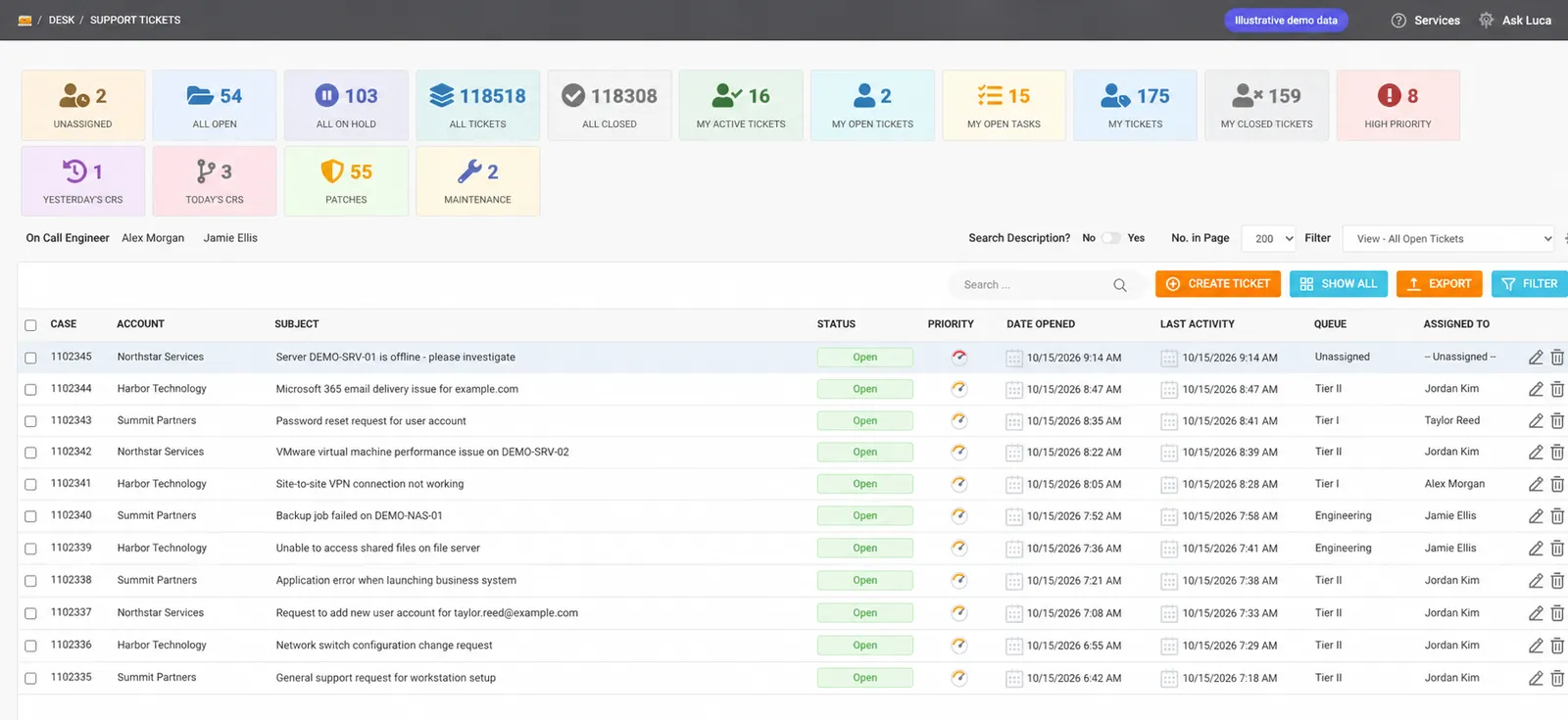
Triage by queue, priority, status and assignee. Reassign work, track progress and connect related tickets so the next action has a clear owner.
Ticket workflow guide
Every ticket is a customer counting on you. Cinch connects support work, monitored devices, customer knowledge and team coordination so MSPs and CSPs can keep service moving from the first alert to the final resolution.
Give technicians the information to act, customers a clearer conversation and service leaders a better view of the work.
Focus the team, preserve the context and make the work visible.
Triage by queue, priority, status and assignee. Reassign work, track progress and connect related tickets so the next action has a clear owner.
Ticket workflow guideWhere enabled, Luca drafts from ticket context and polishes your wording. Your technician reviews the message, chooses recipients and sends it through the normal workflow.
AI reply guideWhen similar-ticket search is enabled, find relevant closed tickets and their written resolutions. Keep internal notes and customer knowledge close to the issue you are solving.
Resolution search guideReview N-able-synced endpoints, active alerts, installed applications and performance. Raise a ticket from the device or alert with that device already linked.
Device management guideMonitor website and service availability with email alerts. Health Checks tracks Veeam configuration-backup notifications and opens tickets for failures or missed check-ins under its monitoring rules.
Health Checks guideDocument risk, affected services, maintenance windows and backout plans inside the ticket. Route changes through peer, internal and customer approvals as required.
Change approval guideFlag tickets and handoff notes on the Message Board. Use Shift Status to see today’s attendance and current team availability before coordinating the next step.
Handoff guideBring engineering shifts, team schedules and patch windows into view. Patch Operations connects scheduled maintenance to linked tickets so the plan stays connected to execution.
Patch scheduling guideBreak larger tickets into owned tasks and record billable or non-billable time with a timer or manual entry. Use dashboard summaries and saved reports to review the work.
Tasks and time guideKeep the conversation, internal notes, tasks, logged time and approvals in the ticket workspace. Connect that work to the customer’s devices and Workbooks so the next technician can pick up with context.
Luca helps with the first draft. Your team stays in control of the customer message and the resolution.
One connected platform for the modules your team uses to support customers and coordinate delivery.
Dashboard · Tickets · Tickets Archive
Read the service picture, work the queue and retain a place for past support records.
Devices · Workbooks · Operations Library
Bring monitored endpoints, customer documentation and operational knowledge into the support conversation.
Uptime Monitor · Health Checks · Message Board · Toasts
Keep monitoring and team communication within reach of the service workspace.
Shift Status · Engineering Calendar · Patch Operations
Coordinate coverage, handoffs and scheduled maintenance alongside the support work.
Reports · Tier 1 Calendar · Tier 2 Calendar · Team Calendar · Management Calendar · Time Entry
Keep team schedules, recorded effort and report documents visible for service coordination.
The ticket brings conversations, notes, tasks and time together. Linked devices add technical context, Workbooks holds customer knowledge, and similar-ticket search can surface useful written resolutions when enabled.
The documented reply tools draft and polish text. Technicians review the content and send the message themselves. AI assistance supports the work; your team owns the outcome.
Health Checks currently watches Veeam configuration-backup notification emails. Failure notifications and missed check-ins can create tickets, with checks to avoid opening duplicates. Uptime Monitor separately checks website and service availability.
Patch Operations brings patch and upgrade schedules together with linked tickets. Schedule customer maintenance windows, coordinate recurring work and keep the service team’s plan connected to the ticket queue.
See how Cinch brings your help desk, customer knowledge and team operations together.