Know where to spend your time.
The Sales Command Center brings pipeline value, closing deals, quotes sent and risk signals into view. Filter by salesperson or closing month, and use the stage funnel to focus the conversation.
Sales dashboard guide
Sales is stronger when it understands service. Cinch brings pipeline activity, customer relationships and delivery context together, helping MSPs and CSPs focus their effort and lead more informed account conversations.
Know the people, the opportunity and the services behind the account. Bring sales and service teams into a shared customer picture before the next decision.
Bring focus to new deals, continuity to relationships and more substance to your growth conversations.
The Sales Command Center brings pipeline value, closing deals, quotes sent and risk signals into view. Filter by salesperson or closing month, and use the stage funnel to focus the conversation.
Sales dashboard guideWhere AI insights are enabled, Cinch reviews deal stage, value, close date and activity to highlight risk and recommend next actions. Built-in rule-based recommendations remain available when AI is unavailable.
AI recommendations guideUse Luca’s re-engagement and deal-progression playbooks to draft a relevant follow-up. Refine the tone, length or call to action, then review and send the message yourself.
Luca communication guideCreate opportunity-linked quotes for managed services, professional services, subscriptions and equipment. Submit ready orders for approval, convert selected quotes into contracts, and create delivery projects through the approval flow where configured.
Opportunity guideKeep account owners, sponsors and technical contacts visible alongside notes, conversations, opportunities, contracts, projects and open tickets. Give the next person a place to understand the relationship before taking action.
Account workspace guideReview services, scope, status, consumption and coverage notes in the Service Matrix. Keep contracts and rate cards close, with synced invoice visibility to help prepare for a more complete account conversation.
Service coverage guideUse the Sales Command Center to identify where attention is needed, then move into the opportunity with customer context already close at hand.
Luca helps turn deal context into a useful first draft. Your team brings the judgment, owns the relationship and decides what happens next.
Explore Luca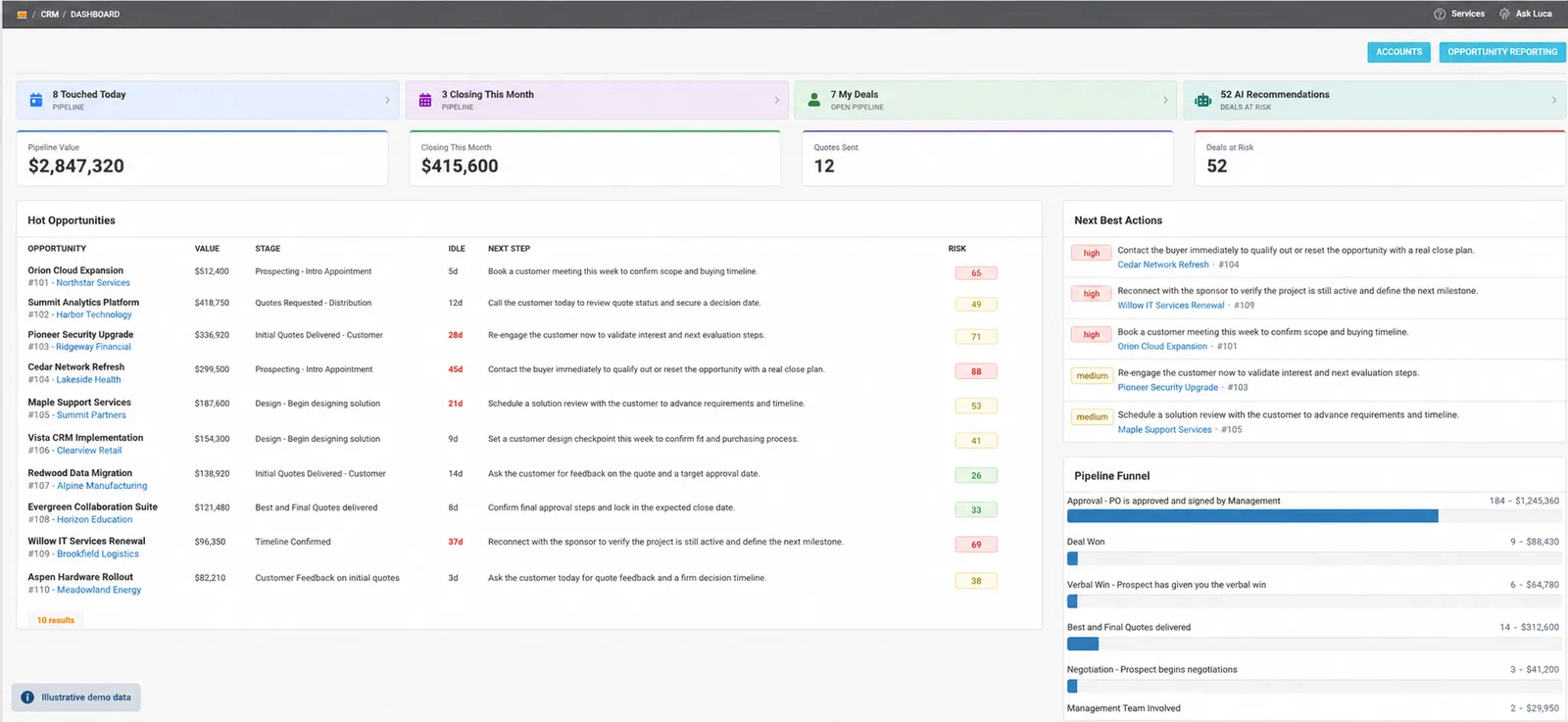
Use the knowledge already in Cinch to discuss what’s working, what needs attention and where the customer should invest next.
Review open tickets, current projects, contracted services and customer contacts before the meeting. Keep the discussion grounded in the work your team is delivering.
Use workbook warranty dates, license renewals and certificate expirations to inform refresh and renewal discussions. Capture the agreed opportunity in CRM so the next step has an owner.
Develop the quote, work through approval and coordinate the project in PSA. Keep sales context and delivery progress accessible from the customer account.
The customer account brings opportunities and contracts together with projects, open tickets and service coverage. Sales and delivery teams can work from the same account context.
Luca drafts and refines messages in the editor. Your team reviews, saves or sends them through the normal workflow, keeping control of the customer communication.
Use account activity, contracts, service coverage and workbook dates to prepare the discussion. Opportunities can be marked as renewals, then tracked through stages and quote approval.
Explore how Cinch connects your sales pipeline to the customers and services behind it.